API for developers
When you need the API
The ready-made connection options (CS-Cart module, WooCommerce plugin, OpenCart extension, feed and widget) cover most stores. You need the API when your platform is custom or you want your own behavior: your own results page, your own sync order, or search inside a mobile app.
- Base URL:
https://api.search.veera.space/v1 - Format: JSON, UTF-8. The catalog is accepted as NDJSON, one product per line.
- Specification: openapi.json. Open it in Swagger UI, Postman or Insomnia, or generate a client from it.
Keys and headers
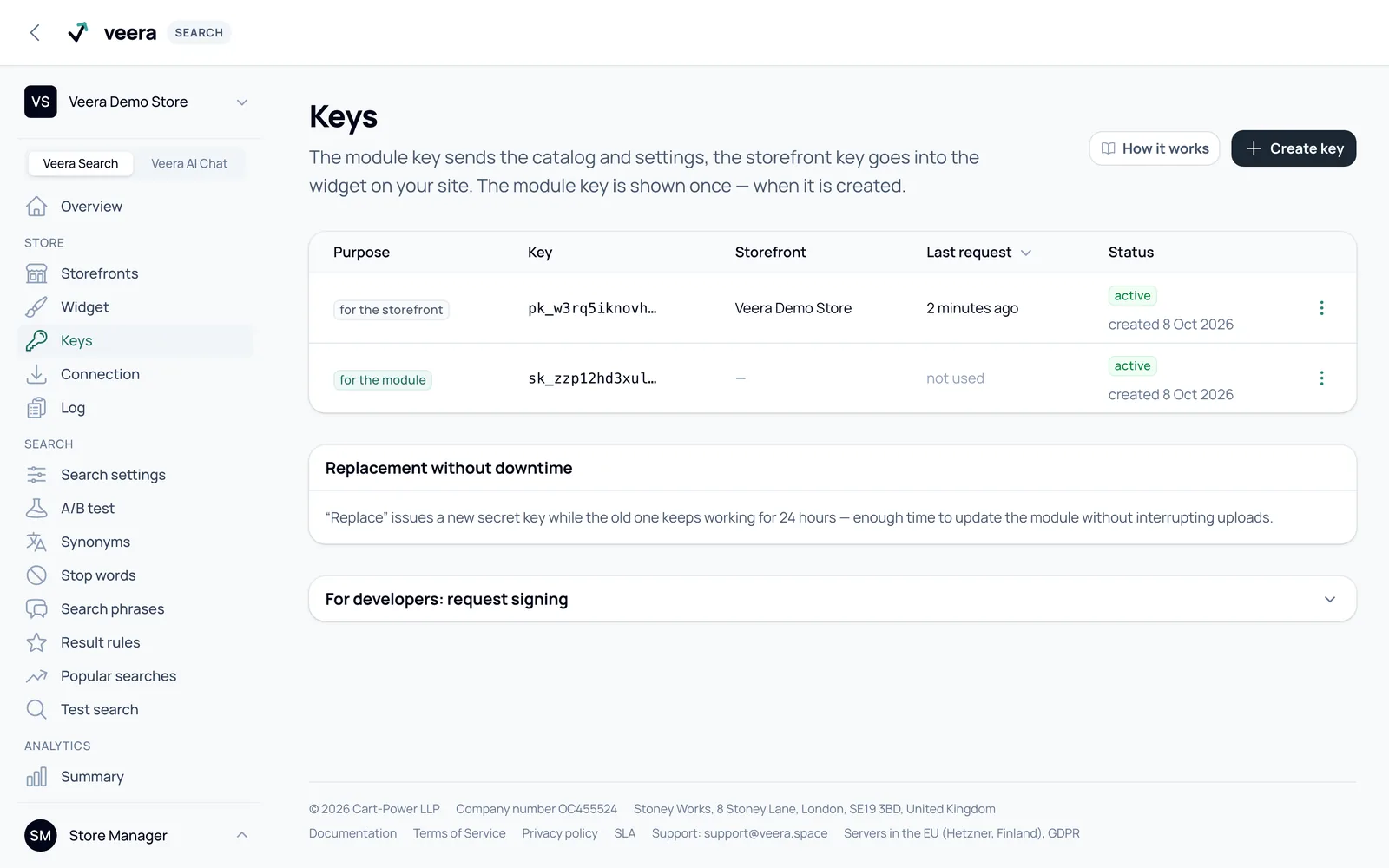
Keys are issued in the dashboard on the Store → Keys screen with the Create key button: type, name, the storefront for a public key, and a requests-per-minute limit. The screen is open to the owner and administrators.
| Key | Used for | How to send |
|---|---|---|
Public pk_… |
Search from the storefront. It is visible in the page code, so it is tied to the storefront domains | X-Api-Key: pk_… or ?key=pk_… |
Secret sk_… |
Catalog, dictionaries, settings; server side only | X-Api-Key: sk_… |
The secret key is shown once when issued. Replacing it gives you 24 hours to update it in your code; revoking it disables the key at once.
Managing keys
The key list has these columns: Purpose (“for the module”, a secret key, or “for the storefront”, a public one), Key (the start of the key; a public key is copied in full with a click, and its name is shown underneath), Storefront, Last request (“not used” if there were none) and Status: “active”, “expires …” for a replaced key that is still working, or “revoked”. Hover over the status to see the key’s requests-per-minute limit.
When you create a key, choose its Type: For the module or API (secret) or For the storefront (public). Name helps tell keys apart in the list (“module”, “wholesale storefront”), Storefront ties a public key to one storefront, and Requests per minute limit is described below.
The actions menu of each key:
- Replace (active secret keys only) opens Replace the secret key: we issue a new key and show it once, and the old one keeps working for 24 more hours, so you can update the module or your code without interrupting uploads. The screen calls this Replacement without downtime.
- Change limit opens Limit of key “…” with the same limit field.
- Revoke: to confirm, type the key name in Type the key name to confirm: …, then click Revoke the key. A revoked key stops working immediately: the module or storefront using it is refused.
Keys are created and managed by the owner or an administrator.
You can sign the body of a request made with the secret key, so it cannot be tampered with in transit:
X-Timestamp: 1758537600
X-Signature: sha256=<HMAC-SHA256(timestamp + "\n" + body, secret key)>
Requests with a clock difference of more than five minutes are rejected. Signing is optional, but we recommend it in production.
Search
curl -s "https://api.search.veera.space/v1/search?q=headphones&limit=10&session=abc123" \
  -H "X-Api-Key: pk_live_key"
Main parameters: q (up to 256 characters), category (category listing without a query), page and limit (up to 100), sort and order, price_from and price_to, attr[code] for attributes (attr_from[code] and attr_to[code] for a range), facets (which filters to return), lang, storefront, flat=1 (do not group by category) and exact=1 (search exactly as typed).
Always send session: analytics is built on it, and the A/B test depends on it. The storefront generates the ID: a random string that lives for one shopper session. It must not contain personal data.
The response contains products, found_items, has_more and next_page, entities (categories, brands, pages), facets, category_groups, did_you_mean and corrected_query, understood (what was recognized in the phrase: price, brand, category), redirect and banner (if a result rule fired), and search_id, the search ID.
Suggestions while typing: GET /v1/suggest?q=head. The window’s start screen (popular searches and popular products before anything is typed): GET /v1/start.
Shopper events
Search works without events, but it goes blind: revenue is not counted, popular products do not rise, and analytics stays empty.
curl -s -X POST https://api.search.veera.space/v1/events \
  -H "X-Api-Key: pk_live_key" -H "Content-Type: application/json" \
  -d '{"events":[{"type":"click","search_id":"s-8f21…","product_id":"1024","session":"abc123"}]}'
Types: search, click, add_to_cart, order. For an order, send amount and order_id. Always pass back the search_id from the search response: it links the click and the order to a specific query.
Catalog
Products are sent in NDJSON batches of up to 8 MB per request:
curl -s -X POST https://api.search.veera.space/v1/catalog/items \
  -H "X-Api-Key: sk_secret_key" -H "Content-Type: application/x-ndjson" \
  --data-binary @items.ndjson
Required product fields: id, name, categories, prices, availability, updated_at. Useful optional fields: sku, codes, url, images, brand, attributes, stock, storefront_ids, description, search_words, position, flags. codes is a list of extra product codes (ERP item numbers, barcodes; up to 20, 100 characters each): a product is found by them just like by sku, but they are not shown on the storefront. One line is one product:
{"id":"1024","name":"Lenovo IdeaPad 3 Notebook","sku":"IP3-15","categories":[{"id":"17","name":"Notebooks"}],"prices":{"price":549},"availability":"in_stock","stock":7,"url":"https://shop.example.com/ideapad-3","images":["https://shop.example.com/i/1024.jpg"],"updated_at":"2026-09-22T10:00:00+00:00"}The response tells you how many lines were accepted and which failed validation: {"accepted": 480, "skipped": 2, "errors": [{"line": 31, "id": "990", "error": "prices: required field"}]}.
Full sync with a snapshot. Open a snapshot (POST /v1/catalog/snapshots), send all batches with the X-Snapshot: <id> header and close it (POST /v1/catalog/snapshots/{id}). This is how the catalog is cleaned of products that are gone from the store. Products missing from the snapshot are not removed at once: closing it marks them, and a marked product leaves the index after the grace period (72 hours by default) unless it comes back in a later batch or snapshot. If more products are missing than the allowed share of the catalog (5% by default; up to 10 products are always allowed), nothing is marked or removed, the response has "refused": true and an email is sent. This protects search from a broken export. The response to closing a snapshot is the reconciliation report: indexed, unchanged, checked, marked, removed, held, live, refused, grace_hours and max_share. The grace period and the share are the store’s removal rules; they are edited in the dashboard on a store with the module connected, otherwise the defaults apply. GET /v1/catalog/status returns them in reconcile, together with pending_removal, the number of products waiting for removal. For individual deletions, use DELETE /v1/catalog/items with a list of ids: they take effect immediately.
Pages and articles are sent the same way: POST /v1/catalog/pages. Index and queue status: GET /v1/catalog/status.
Dictionaries and settings
GET|PUT /v1/dictionaries/{type}: synonyms, stop words, search phrases. PUT replaces the whole dictionary.PUT /v1/store/settingsandPUT /v1/store/search-settings: store and search settings, if you manage them from your own system rather than in the dashboard.
What each setting means is covered in Search settings and dictionaries.
Rate limits and errors
Each key, public or secret, has its own requests-per-minute limit. It is set when the key is issued and can be changed in the key list with the Change limit action; the new value applies from the next request. The allowed range is 60 to 60,000, with a default of 1,200. For a secret key, the service applies at least 300 requests per minute even if you set less, so catalog batches are not lost because of an accidentally low number.
Every response includes the X-RateLimit-Limit and X-RateLimit-Remaining headers. Over the limit, the API returns 429 until the end of the minute:
{"error": {"code": "rate_limited", "message": "Key request limit exceeded"}}The rejection comes with a Retry-After header that says how many seconds to wait before retrying. A request that got 429 was not executed: send the catalog batch again after the pause.
All errors have the same shape:
{"error": {"code": "bad_request", "message": "q: 1 to 256 characters (or category without q)"}}| Code | Meaning |
|---|---|
400 bad_request |
Invalid request parameters |
401 invalid_key |
The key is wrong or revoked, or the storefront domain is not allowed |
404 snapshot_closed |
The snapshot does not exist or has expired |
413 too_large |
The batch is larger than 8 MB; split it |
429 rate_limited |
The key’s request limit is exceeded; retry after Retry-After seconds |
Health check: GET /v1/health. If search is unavailable, your storefront should fall back to the platform’s built-in search, so a cloud failure does not stop your sales.
Not available yet
We do not publish client libraries: the OpenAPI specification is enough to generate a client for your language. If you need help with an integration, write to support@veera.space. We will advise on catalog fields and review your requests on our test environment.