Data and security
Where data is stored
Veera is hosted in the EU, on dedicated servers at Hetzner in Finland. They hold the catalog index, the dashboard database, assistant conversations and knowledge. Nightly backups go to separate storage in Germany.
Veera Search runs entirely on these servers. Veera AI Chat calls a language model outside the EU (OpenAI, USA) to write its answers. This is a transfer outside the EU: OpenAI is on our sub-processor list, and the transfer and its safeguards are described in the privacy policy and the data processing agreement.
The service is provided by Cart-Power LLP, registered in England and Wales. Documents: Terms of Service, privacy policy, data processing agreement (DPA) and SLA. Under GDPR and UK GDPR, your store is the controller of shopper data, and Cart-Power LLP processes it on your behalf as a processor. Our sub-processors include Hetzner (hosting), OpenAI (language model) and Cloudflare (DNS); the full list is in the legal section.
What we store about shoppers
Search. Search queries, a session ID, and click, cart and order events. No names, phone numbers or emails: only what the shopper typed into search and what they clicked after that.
Assistant. Message texts, products shown and the steps of the conversation. With each conversation we also keep where the shopper wrote from: IP address, browser, operating system and device, languages, the referring page and the pages of the visit. Your team sees them next to the conversation. Contact details (name, phone, email, company) are stored only if the shopper left them, and, if you turn on Require consent to data processing, only with the consent box ticked. You see these contacts in the dashboard; Veera shows a link to your privacy policy in the form.
Catalog. Names, SKUs, attributes, prices, stock, categories, store pages and articles. This is store data and contains no personal data.
What is sent to the language model
Before a message goes to the model, phone numbers, email addresses and bank card numbers are automatically removed and replaced with placeholders; in the reply, the placeholders are swapped back. Names, addresses and order numbers are not masked: if the shopper wrote them, they go to the model as part of the text.
The model receives the shopper’s question, the latest turns of the conversation, the relevant pieces of knowledge, product cards and the store settings. Contact details from the assistant’s form are not sent to the model. With photo search on, a product photo the shopper sends is processed on Veera’s servers to find similar products and is not sent to the AI model.
Two dashboard buttons work without masking: Summary and Translation in a conversation send the transcript to the model as is. If you connect a Telegram bot for your team, its alerts include a fragment of the shopper’s message.
Model keys and integration secrets are stored encrypted. Where your plan allows it, you can connect your own model provider key; requests to the model then go under your own account.
Analytics on your site
The search widget can also send events to Google Analytics 4 if it is installed on your store’s pages. This is off by default: the store turns it on with the Events to GA4 toggle on the Store → Widget screen or with data-analytics="on" in the widget tag. The events include the search query text. Analytics in the Veera dashboard is not affected. See the widget guide for details.
Retention periods
| Data | Period |
|---|---|
| Shopper search queries and events | Analytics history of your plan (see pricing), then only daily totals without session identifiers; you can shorten it to 7 days in settings |
| Assistant conversations | 365 days from the last message; you can shorten it to 7 days in the dashboard |
| Shopper attachments | 90 days |
| The assistant’s internal step log | 90 days, then de-identified and used to improve the Service (DPA clauses 13.5–13.6), or deleted if the store has asked us to stop this use |
| Where the shopper wrote from: IP address, browser and device, languages, referring page and pages of the visit | 90 days after the conversation was last active, or earlier if the conversation is deleted |
| Shopper contacts | Until the store deletes them or the contract ends |
| The conversation list | For the term of the conversation, then de-identified as the step log |
| Dashboard activity log | 12 months |
| Requests sent through the veera.space website | Until the person asks us to delete them, and no longer than 3 years after they last contacted us |
Retention periods for shopper data are set out in Annex 1 of the data processing agreement, and for your team’s data in the privacy policy; the exact analytics period for your plan is shown on the analytics screen. What your plan counts is covered in Plan, limits and team.
Keys and access
- Public key (
pk_…) is for the widget. It is visible in the page code, so it is tied to your storefront domains; requests from other domains are rejected. - Secret key (
sk_…) is for the module and the API and is shown once when issued. Replacing it gives you 24 hours to update the key in your module, after which the old one stops working; revoking a key disables it at once. - Each key has its own Requests per minute limit and shows the time of its Last request, so you can spot a key left behind on a test site.
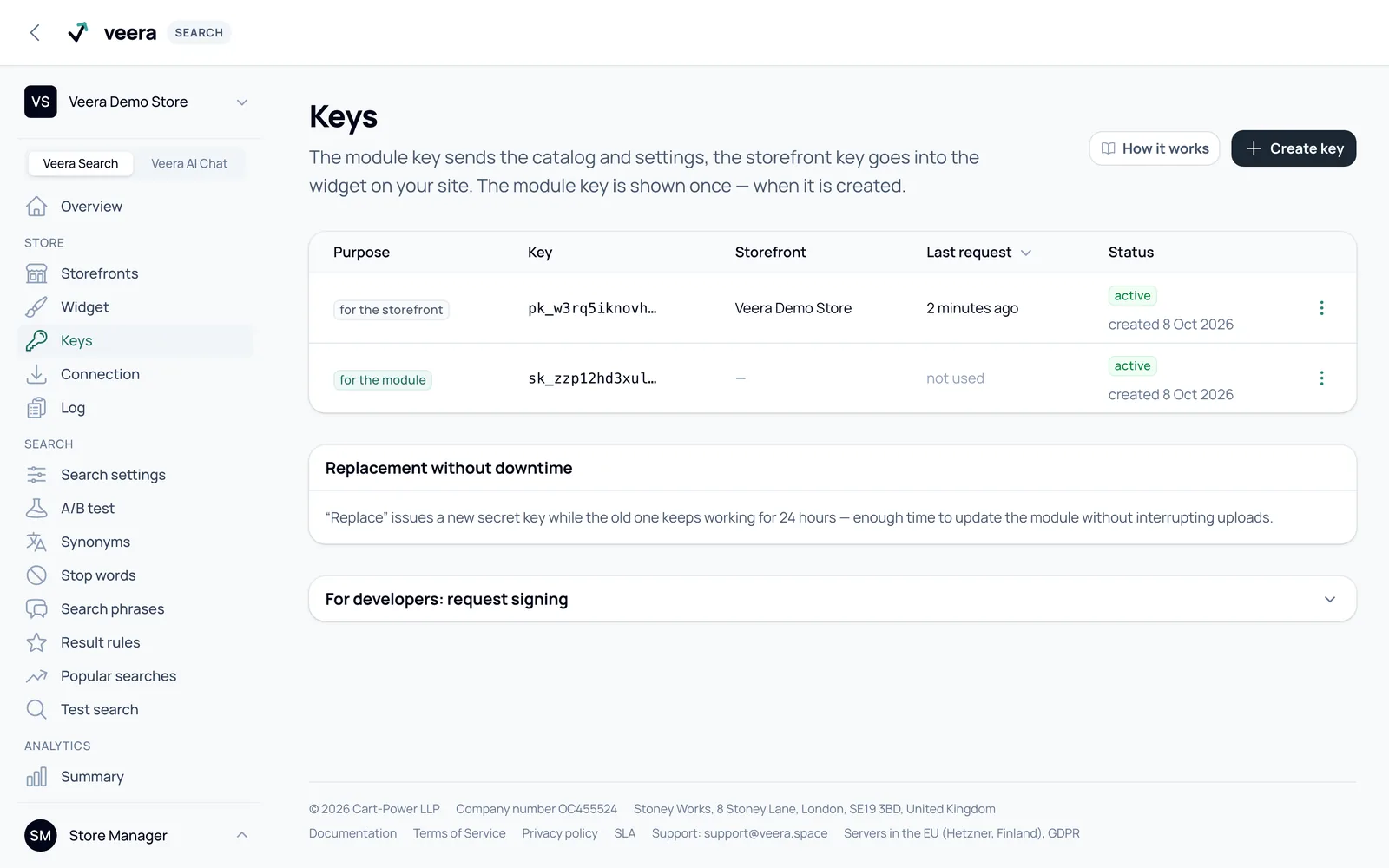
You can protect dashboard sign-in with a second factor: an authenticator app with recovery codes, or a code sent by email. Each user turns it on in their profile, and it applies to both search and the assistant.
Team roles (owner, administrator, manager and operator) are described in Plan, limits and team. An operator sees only the assistant’s conversations and contacts.
Activity log
The dashboard keeps a log of who changed settings, dictionaries and rules and when, who issued and revoked keys, turned on the assistant, exported contacts or deleted shopper data. The log is available to the owner and administrators. It also helps you find out why search “suddenly changed”.
Shopper data requests under GDPR
If a shopper asks you to delete their data, you can do it from the dashboard: in an assistant conversation, click Delete shopper data (available to the owner). This deletes all of the shopper’s conversations, history, contact details and team notes, with no way to restore them, erases their messages and the assistant’s replies in the internal step log and de-identifies the rest of it (DPA clause 10.2), and records the event in the log. Search data is pseudonymous: it holds a session ID and, for orders, the order number, but no names or contact details. If a shopper’s request concerns a particular order, write to us and we will delete the search events for that order.
If such requests reach us, we forward them to you, because your store is the controller of shopper data. For requests about dashboard data (your staff), write to support@veera.space with the subject “Personal data”.
Reliability
The database and indexes are backed up every night to separate storage in Germany. TLS encryption is used on all endpoints. Automated uptime monitoring alerts our engineers. Availability targets and compensation are set out in the SLA; on Enterprise, the terms are set by the contract.
If cloud search is unavailable, your store keeps working: the module switches the storefront back to the platform’s built-in search, and the assistant window simply does not open. A failure on our side does not stop your sales.
To take your data with you or move to another provider, see Data export and switching.